About This Project
Tip Tracker is a personal mobile application I built to solve a real problem I face as a working bartender — keeping track of how much I earn in tips each shift, split between cash and credit card payments.
Rather than relying on a notes app or trying to remember at the end of the week, Tip Tracker gives me a dedicated place to log each day's earnings, review past entries, and see visual breakdowns of my income over time. Every feature in the app was designed around my own daily workflow.
Features
- Log daily cash and credit card tips with a clean, simple entry screen
- Home dashboard showing today's totals, this week's earnings, and this month's earnings at a glance
- Full tip history with the ability to tap any entry to edit or delete it
- Confirmation dialogs on all edits and deletes to prevent mistakes
- Interactive bar graph showing cash and credit card tips side by side
- Toggle the graph between Day, Week, Month, and Year views
- Grand total and per-category totals displayed below the graph for each time period
- All data stored locally on device using SQLite — no account or internet required
- Dark theme UI with a custom app icon
Tech Stack
- C# — Primary programming language
- .NET MAUI — Cross-platform mobile framework
- XAML — UI markup language
- SQLite — Local database storage
- sqlite-net-pcl — SQLite ORM library
- Microcharts — Bar graph rendering
- SkiaSharp — 2D graphics engine
- Visual Studio Community — IDE
Build Process
Project Setup & UI Foundation — Created a new .NET MAUI project in Visual Studio Community. Set up the Android emulator and established the dark theme. Built the home screen layout using XAML with VerticalStackLayout, Labels, Frames, and a BoxView divider. Connected a dynamic date label from C# to the UI.
Navigation & Page Structure — Set up Shell-based navigation with AppShell.xaml and registered routes for each page. Built the Add Tips page with numeric Entry fields and wired up the Save button. Implemented navigation using Shell.Current.GoToAsync.
Database Integration — Installed sqlite-net-pcl and created a TipEntry model class with SQLite attributes. Built a DatabaseService class with async methods for saving, retrieving, updating, and deleting entries. Registered the service as a singleton using dependency injection in MauiProgram.cs.
Tab Bar & Multi-Page Layout — Converted the app to a tab bar layout using Shell's TabBar and ShellContent elements. Registered all pages as services in MauiProgram.cs.
History Page with Edit & Delete — Built the History page using a CollectionView with a custom DataTemplate. Implemented tap selection that opens an ActionSheet with Edit and Delete options. Created the Edit page with QueryProperty for passing the entry ID through navigation.
Graph Page & Data Visualization — Installed Microcharts.Maui and SkiaSharp. Built a bar chart with color-coded bars — green for cash, blue for credit — with a toggle between Day, Week, Month, and Year views. Added totals and a grand total below the chart.
Home Dashboard Totals — Extended the home screen to show three summary cards for today, this week, and this month. All three update automatically using the OnAppearing lifecycle method.
What I Learned
- How to build and structure a real mobile app using .NET MAUI and XAML from scratch
- Shell-based navigation, route registration, and passing data between pages using QueryProperty
- Setting up SQLite with an ORM and writing async CRUD operations
- Dependency injection in .NET — registering services as singletons and transients
- Integrating third-party NuGet packages and working through compatibility issues
- Debugging Android runtime exceptions and using try/catch to surface hidden errors
- Binding data from a database to a live UI using CollectionView and DataTemplates
Screenshots
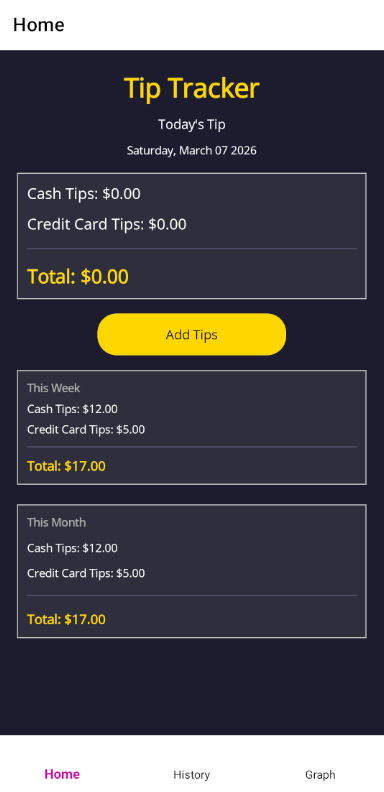
Home Dashboard
The home screen displays today's date and shows three summary cards — today's tips, this week's total, and this month's total. All three update automatically every time you return to the screen.
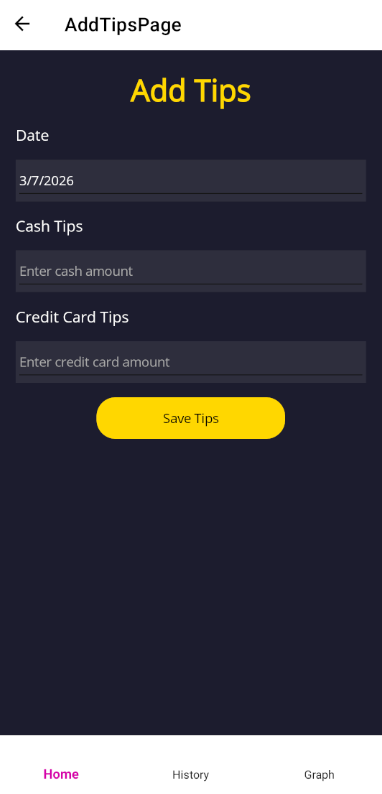
Add Tips
The Add Tips screen lets you log cash and credit card tips for any date using the date picker. Defaults to today for quick entry after a shift.
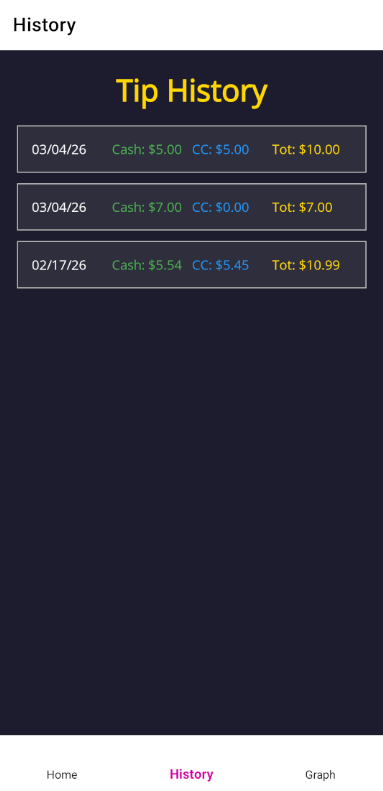
Tip History
The History page lists all saved entries newest first. Tap any entry to edit the amounts or date, or delete it entirely with a confirmation prompt.
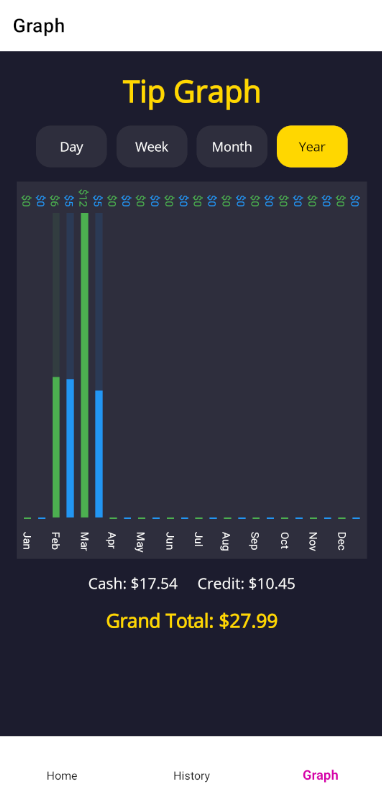
Earnings Graph
The Graph page visualizes your tips as a bar chart with green for cash and blue for credit card tips. Toggle between Day, Week, Month, and Year views with totals shown below.